Sunday, 28 December 2025

Been a long time!

It's been so long since there was anything to update. So long that
there's a certain NIF to it!

Hey who moved this barrier!!!

Friday, 2 July 2021

Progress update

So just a little progress update.

Things have stalled a little as I've changed jobs and currently don't have much free time to work on none work projects. But I will still get there!

Tuesday, 6 April 2021

Vertex data extraction

Still making progress on automated model extraction.

So far automated vertex extraction is pretty much finished.

Here's some vertex data pulled from the Character section of the game files.


And here's some vertex data extracted from the level files as the format is luckily the same.


You can clearly see there is a model lurking in there :)

The next challenge is getting the face data that goes along with these so that you can see the actual models properly. This is about 50% done.

After that is working then it's onto automated rebuilding of the game files from extracted data and then we can start trying to modify the models!


Monday, 29 March 2021

More modding progress

So a few things have moved on:

Shaders fix for A Dangerous Voyage

I've published the shaders fix for A Dangerous Voyage as a Vortex mod here to make it easier for everyone to apply.

Windowed mode

I've also got DCoTEHook now reading the <WinWindowed>0</WinWindowed> xml setting and hooking Direct3D so that the game now runs windowed if that is set to 1. This makes testing things in the game much easier!

You can either change the xml yourself or there will be a Vortex mod to do it for you.

This will be published soon in the next version of the DCoTEHook mod once I've wrapped some other things up.

Model extraction

I needed some help getting started with extracting the character models. I'd managed to work out roughly where they were in the games files so went to the experts over on XeNTaX Game Research Forum. User shakotay2 managed to show me a tool and an example model extract to get me heading in the right direction so hopefully I can make some progress now.


Saturday, 6 March 2021

Injecting XML into the Steam version

So using DCoTEHook I've managed to get the Steam version of the game loading in modified xml settings.

This means access to the debug menu, reach arm, picking start level etc for people who bought the game on Steam.


Hopefully this will also allow introducing the GOG fixes to fps that will fix the scripting issues.

At the moment I had to modify C:\Steam\steamapps\common\Call of Cthulhu\install.vdf to point to the Hook instead of the main executable which whilst not ideal from a Vortex modding point of view will do for now.

EDIT: Thanks to advice from the Nexus Mods forum I've now worked out that you just need to set an env var of SteamAppId=22340 when launching the Steam exe to not have to change install.vdf. The updated 0.4 hook has now been uploaded and awaiting approval.

So next task is getting DCoTEHook to load patch files to patch the exe on startup.

Thursday, 4 March 2021

Vortex mods are now uploaded

I've uploaded the vortex mods and the hook, as it's an exe, has now been approved as safe.

You need the Vortex game support mod first https://www.nexusmods.com/site/mods/211

And then the DCoTEHook mod https://www.nexusmods.com/callofcthulhudarkcornersoftheearth/mods/3

So far this is only working with Retail and GOG versions, but seeing as we are now hooking into the exe it may be possible to get the Steam version working.

Next up is adding in a mod that will patch the exe to sort the bugs. So that's the 60fps lock and shader fixes that are in the GOG version.

To patch the main exe I'll likely use a DCoTEHook0.patch file in the mod that the Hook will look for to determine which bytes to patch in the exe so that I don't need to publish the exe or copy it into the mods directory.

I also don't know if I can publish the fixed shaders in a vortex mod, although they are transformed, as they aren't really my work. So I may have to take a similar approach of copy from base and patch.

(I've allowed donations on the mods pages so that if anyone wants to donate they can. All donations will be sent on to Kings Heath Cat Club Rescue [https://twitter.com/KH_CatClub] where I adopted my awesome Cuculla from <3)


Saturday, 27 February 2021

Hook updated to dump and load xml settings

The hook has now been updated to dump the xml values from the exe into the mods\Settings directory when it is first run.


On subsequent runs the xml values are loaded in to the exe before it is started.

So you can now change all the xml values without needing to change your base install or run the patch.

As the files are loaded into fixed memory areas in the exe you must not exceed the original length of the file. You can usually remove some comments etc if you need extra space after your changes.  The hook will warn you if you have exceeded the original length and not load the xml in.

Tuesday, 23 February 2021

Adding mod support

So it turned out that someone had already run my toolset and published updated textures to Nexus Mods (Sharp Corners of the Earth). This is good as it allows me to concentrate on what I was going to do next.

Which is...

Adding support for DCoTE to Nexus Mods mod manager Vortex :)


So I've created a DCoTE game extension for Vortex which installs the Sharp Corners of the Earth texture mod into a mods directory inside your game install. Vortex does this by downloading the mod zip, extracting it to its own staging directory and then creating symlinks to the files into your games mods directory. This makes it really easy to enable and disable mods at will.

This was all great but of course the CocMainWin32.exe wasn't going to go looking in that mods directory for mods.

Something I'd been planning on doing for a long time is looking into hooking into CocMainWin32.exe so that I can then modify things at runtime instead of patching the exe up front. And to get the game to look for mod files I can use the same method to hook into it's file opens and decide to open the mod file or the games original file.

So that's what DCoTEHook is all about. Hooking into the games file opens so that it can pick up the symlink files that Vortex has put in the mods directory. This can work without Vortex of course if anyone is interested in trying it whilst I polish up the Vortex game extension for release.

Maybe I can get it to load in the xml settings section in the game from an external file in the future.

Friday, 15 May 2020

More texturing

Well how time has flown but still there are things to be done!

So I now have a 2080ti so it's back to the texture upscaling.
Here are a couple of examples of the upscaled de-noised textures.
Blood splat
Smoke
Character skin
I'm hoping to get a first release ready for people to beta test within the next couple of weeks.


Monday, 17 September 2018

The power of machine learning

I really should be working on other things right now but I'm having a play with some machine learning.
(I've now shrunk the images as you can click on them to see them larger)

This is certainly bigger...

And this is 10x the size...

Small textures...

Four times bigger textures...

And it looks good before...
 But this is promising...

Copper before


Copper after

(In game screenshots taken at 4k)

Tuesday, 15 May 2018

Checking for models

Just as a quick diversion from work I thought I'd look at the .naf files again and see if there was any way to get the models out.
The only real way to do this without knowing the format is to use process monitor from sysinternals to track the read access to the file and then dump it out to be processed.

So we end up with this kind of file where we can see the offsets that are being read from the file and the lengths that are being read. In this way we can work out the things like reads that are lengths of what to read next.


 So then writing some code to parse this file into something useful and look for these length values we end up with output like this.


The big lengths are what we are interested in here and you can see for example a length of 236,900 and 2 reads before it a potential length value of 11,845. If you divide 236,900 by 11,845 you get 20 exactly which suggests that this is 20 byte values repeated 11,845 times. 20 bytes would be 5 lots of 4 byte values. This could potentially be vertices and texture coordinates.

The 42 then 1 then 349680 are the dds files and you can see them increment as they go along.

Texture tool chain

Just a quick update to include a page for the texture roundtrip tool chain here: texture toolchain

Saturday, 21 April 2018

1.7 with the fps fix

I've released version 1.7 which includes the GOG 60 FPS fix which should fix most of the script timings crashes that people are experiencing.
I've tried to work through recreating these timing issues to fix the scripts but it's REALLY hard to work out where the problem lies with most of them so this is most likely the best fix.
You can download version 1.7 here.

More details on the DCoTEPatch page.

Saturday, 6 January 2018

The Hanging Woman bug

So I've taken a break from getting a 100% binary correct recompile as it's proving difficult!

Instead I thought I'd see if I can use what I have so far to fix some of the know bugs with the game within the game scripts so that they would work with all versions including the Steam one.

Somebody posted a list up here on steam so starting with the first one:

The Hanging Lady
This is a problem where you enter a room and there is a shock piece where your controls are frozen, your view is snap focused on the shock piece with some sound effects and then your controls are unfrozen.
The problem is that for people whose frame rates are higher than 60 this part crashes.
So I looked at the code for this that the decompiler had produced:

nVar767 = D_PlaySoundPositional("sound\sfx\01132.wav", ptVar763, 1.0, 900.0, 0);
D_SetGlobalInt("Hanging_Woman_Handle", nVar767);

nVar768 = D_GetInsanityShockTriggered("COURIER_HUNG_WOMAN_SHOCK");
if (nVar768 == 0)
{
  nVar768 = D_GetGlobalInt("Shock_Played");
  if (nVar768 == 0)
  {
    D_PlayerLockMove();
    D_EnableInsanityShock("COURIER_HUNG_WOMAN_SHOCK", 1);
    D_PlayerWatchObject("*REMOVEINSTATIC_BGANIM_HANGING", 1, "WatchRateVeryResponsive");
    D_EnableVisibilityTrigger("HOLY_SHIT", 0);
    D_SetGlobalInt("Shock_Played", 1);
    Wait(3.0);
    PlayerSayWithoutSuspend(4167, 1);
    D_PlayerUnlock();
    D_PlayerReleaseWatch();
  }
}
>
First it plays a positional sound and stores a handle to that sound so that it can later stop the sound from playing.
Next it checks if the shock has already played and if not then goes about playing the shock.
In the shock the player controls are locked out, the player is forced to watch the shock object, there is a pause of 3 seconds then the player controls and forced watch is released.
Within this some flags are set that are later going to be checked again to see if the shock has already been played.

Now my guess was that this was happening too fast when the fps was higher than 60 and that the handles and flags being set were being run multiple times at the same time.
The scripting engine handles this kind of problem by using BeginSafeBlock() and EndSafeBlock() to ensure that only one script is in this section at a time.

So this should fix it:

BeginSafeBlock();

nVar767 = D_PlaySoundPositional("sound\sfx\01132.wav", ptVar763, 1.0, 900.0, 0);
D_SetGlobalInt("Hanging_Woman_Handle", nVar767);

nVar768 = D_GetInsanityShockTriggered("COURIER_HUNG_WOMAN_SHOCK");
if (nVar768 == 0)
{
  nVar768 = D_GetGlobalInt("Shock_Played");
  if (nVar768 == 0)
  {
    D_PlayerLockMove();
    D_EnableInsanityShock("COURIER_HUNG_WOMAN_SHOCK", 1);
    D_PlayerWatchObject("*REMOVEINSTATIC_BGANIM_HANGING", 1, "WatchRateVeryResponsive");
    D_EnableVisibilityTrigger("HOLY_SHIT", 0);
    D_SetGlobalInt("Shock_Played", 1);
    Wait(3.0);
    PlayerSayWithoutSuspend(4167, 1);
    D_PlayerUnlock();
    D_PlayerReleaseWatch();
  }
}

EndSafeBlock();
And after testing, with help from a program called Special K, it does indeed fix the problem!

Will add this fix into the patcher when I get the chance :)

Monday, 4 December 2017

So close!

5,284 scripts now compile to correct size :)
Only 1 script left that doesn't!

This one is going to take a lot of work though by the look :/

New version 0.3 available here: Version 0.3 dcotetools.zip

Saturday, 2 December 2017

Almost there

Good progress still being made with 5,267 scripts compiling to the same byte size and only 18 failing now.
These failures are down to bad code in the original source which I need to recreate to get a solid baseline for any changes.

New version 0.2 available here: Version 0.2 dcotetools.zip

Thursday, 30 November 2017

DCoTETools preview release

The tools for scripting are now at a point where they are worth sharing :)
And luckily they work with all versions of the game.

Script wise 4,985 scripts compile to the same size as the original scripts which is a good sign they are probably correct.  There are some complex reasons why a lot are not binary identical but I should be able to work around that later.  There are 300 scripts remaining that won't fully decompile yet but I'm working on that also.

So the bottom line is whilst you can read the extracted script sources, make changes and rebuild them into .bat files you cannot run against those new .bat files ... yet (see note at bottom)!

You can download the tools here dcotetools.zip
Updated version here: Version 0.2 dcotetools.zip

To see them working:

Extract the zip file into the Scripts directory of your install.
This will be something like "C:\Program Files\Bethesda Softworks\Call Of Cthulhu DCoTE\Scripts\"
That directory will contain several .bat files which are the squashed binary script files.

Open a command prompt at that location and then start by executing:
SucUnbatch.exe . bin list
This will extract the individual compiled scripts out into the bin directory and puts the list of which scripts go into which .bat files into the list directory.

Next we need to decompile the binary scripts into source:
SucDecompiler.exe bin src
This will decompile the binary scripts in bin into the src directory.

You can go and look at the scripts in src and maybe try and find some bugs :)

To recompile any changes that you make use:
SucCompiler.exe src newbin
This will recompile the source files into binary files in the newbin directory.

Finally to squash the binary scripts back into .bat files:
SucBatch.exe newbin list newbat
This will use the files in the list directory to squash the correct newly built binaries into the newbat directory.

You should now have a new set of matching .bat files in the newbat directory.

And at some point soon you could replace your original .bat files with these and play with the changes you have made.

Once I've got everything decompiling correctly I'll put together a package using visual studio code and the tools to allow you to change a file, have it compile on save and rebuild your batch files to allow quick testing of code changes.

If you were to change one of the scripts that currently does decompile correctly you could take the newly compiled .bin file from newbin, merge it with the original unbatched .bin files in bin and then use the batch tool to create new .bat files that contained that change.
So, for example, copy the files from bin into testbin, copy your new bin file from newbin into testbin, run:
SucBatch.exe testbin list testbat
That would more than likely work!

Wednesday, 29 November 2017

Decompiler rewrite progress

A move of PCs meant that I stupidly lost a chunk of the work I did on the decompiler a couple of years back so I'm having to rewrite it.

Progress is going well and I've covered most of the 'easier' decompilation now which means that 2/3 of the binary scripts decompile to source and then recompile to the same binary as extracted from the game.

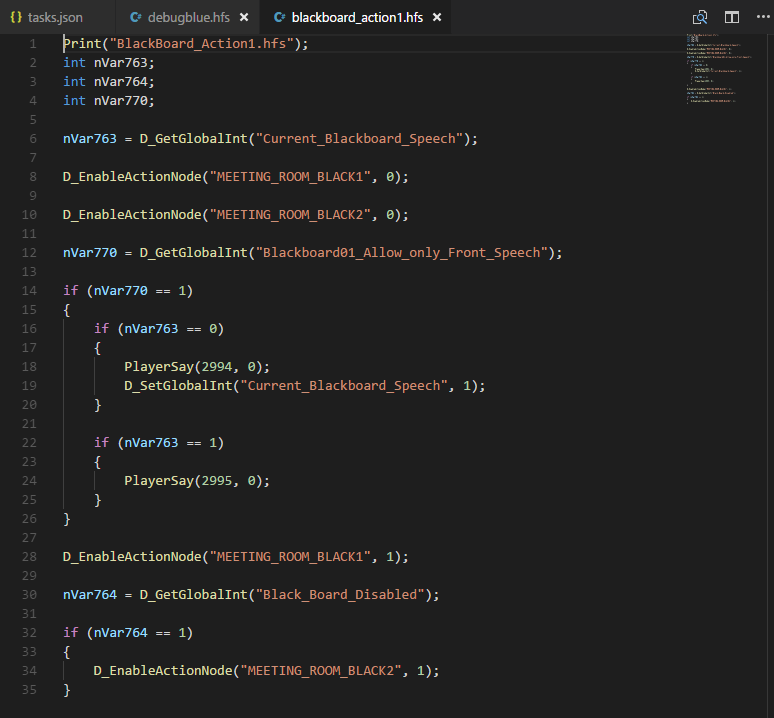
Here's an example of how the decompiled source looks atm.

Compared to the debug source files extracted from the xbox version this obviously doesn't have any of the comments or helpfully named variables.
I'm using the c# Roslyn compiler functionality as the source syntax is near enough c# which should mean I can work out some better variable names once everything decompiles correctly.

I am finding bugs in the binary code which atm I'm working around and recreating in the new source
so that I can get a baseline match. Also there are some scripts only on the PC version and differences  from the xbox code which makes things harder but I can deal with those later.

I've switch from Eclipse as a script platform to visual studio code which I'll put details up about later.

Sunday, 26 November 2017

1.6 with shader changes

As part of the push to get everything shared I've added the shader fixes from Guzz to the patcher and released as version 1.6 here.

More details on the DCoTEPatch page.

Friday, 24 November 2017

That is not dead which can eternal lie

Despite good intentions real life stuff is always getting in the way and I keep having to stop working on this project. It's never good to see that the thing you wanted to help out with was from a comment two years ago...where the heck did that time go!!!

Due to renewed interest from the GOG release I'm picking this up again and trying to get all my tools and code uploaded at a minimum. Most of the tools binaries were up already and some of the source. The main omission was the decompiler as it could decompile the majority of code but anywhere that functions were called within if statements, for example, it didn't work.

There is interest in the textures and the possibility of a hires set and though that is a massive undertaking it's something I'd like to see. Looking back my previous tests suggested that it was possible using the tools I've written in that the larger textures would be loaded. However I realise that I didn't really check that they were properly rendered in a higher resolution. Something to check now.

The fixed shaders for the blue light bug is definitely something I want to add in to the patch to help people get those applied and stop having to use the workaround method.

So the plan is upload code, upload decompiler, document how to roundtrip the textures out and back in again, add shader fix to patch. But, and it is a big but, I'm not sure I have time to complete the compiler so it may be down to someone else to do that.